
WordPress Appointment Booking with a Plugin
Your customers book appointments around the clock directly on your WordPress website.
With the free Appointmind plugin, you can add an online appointment calendar to any page and post. Your customers see only available appointments and book them themselves. You receive the booking by email and save yourself follow-up phone calls.
The plugin shows the calendar on your website. The booking system itself runs at Appointmind and costs from €20 per month, cancellable monthly.
Appointment Booking in WordPress in Four Steps
- Install the plugin. In WordPress, search for "Appointmind" under Plugins > Add New, click Install Now and activate the plugin.
- Enter the calendar URL. In Appointmind, copy the URL under Configuration > Appointment Calendar and paste it into WordPress under Settings > Appointmind Calendar.
- Insert the shortcode. In a page or post, add the Shortcode block and enter
[appointmind_calendar]. - Save. The calendar now appears in this spot and your customers can book.
The guide with screenshots shows each step in detail.

Shortcodes of the WordPress Plugin
These shortcodes determine which calendar appears on which page. The id, reason and language options can be combined.
| Shortcode | Effect |
|---|---|
[appointmind_calendar] |
Shows the calendar whose URL you entered in the plugin settings. |
[appointmind_calendar id="..."] |
Shows a specific calendar. You can find the ready-made shortcode in Appointmind under Configuration > Appointment Calendar. |
[appointmind_calendar reason="..."] |
Opens the calendar with a specific appointment reason. |
[appointmind_calendar language="en"] |
Shows the calendar in another language. |
[appointmind_patient_order form="referral"] |
Embeds a patient form. Possible values are labresults, referral and prescription. |
For the sidebar, the plugin includes a widget. It shows a link that opens the calendar in a separate window.
The Difference from a Classic Booking Plugin
Many WordPress booking plugins store appointments and customer data in your WordPress installation. With Appointmind, booking runs separately and is embedded in your page as an iframe.
- Data in Germany: Appointment and customer data is stored on our servers in Germany, not in your WordPress database.
- No booking software to maintain: We take care of updates and data backups.
- Independent of the theme: Your appointments and settings remain intact when you change themes.
- Not just for WordPress: You can also embed the same calendar in other websites.
Good to know: As an iframe, the calendar does not automatically adopt the fonts and colors of your theme. You set colors and formats in Appointmind.
Features of WordPress Appointment Booking
Individual Appointment Reasons
You can set up your own appointment reasons with any duration.
Synchronization
Your appointments can be synchronized bidirectionally with iPhone, Apple Calendar, Outlook, and Android.
Customize Colors
Adapt the colors and formats of the calendar to the design of your website.
Email and SMS Reminders
Fewer missed appointments thanks to reminders via email and SMS.
Flexible Appointment Times
You can set start times of your appointments according to your wishes.
With or Without Password
You can decide whether your customers can reserve appointments as guests or need to register.
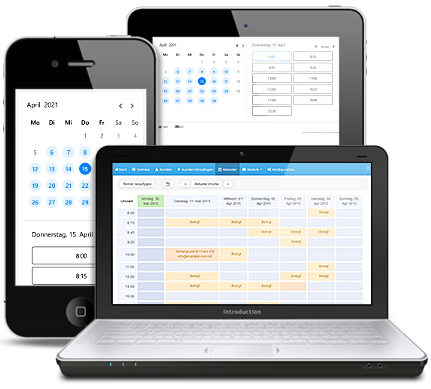
Responsive for Smartphones
The appointment calendar is optimized for small screens.
Collect Customer Data
During the appointment booking, customers can enter personal data such as phone number or a remark.
Who the Appointment Booking Is For
Personal Appointments
For driving schools and driving instructors, massage practices, therapists, doctors, city administrations and municipalities, financial advisors, insurance brokers, golf pros and dance instructors.
Courses and Events
For courses and events with multiple participants and times, for example with the event calendar.
Rental and Reservation
For equipment, vehicles or rooms, for example in clubs, medical practices, gyms and rental businesses.
Callback Appointments
The callback form only suggests times that are free in your calendar.
Integrated with WordPress and Many Other Services

Google Calendar Synchronization
You can synchronize your appointment booking with many other programs and devices via the interface to Google Calendar.

Payment Function
Customers can pay for the appointment with credit card, PayPal, instant bank transfer, or direct debit before or after booking the appointment.

Proven Expert
Appointmind automatically sends an email to the end customer after each appointment with a link to the rating survey at Proven Expert.

Meetings
Meetings support your entire sales process, from initial contact and appointment coordination to live consulting with video communication and screen sharing.
What Customers Say About Appointmind
"The Appointmind calendar replaces a member of staff and puts opening hours out of action. Anywhere in the world I can see the booked appointments on my iPhone right away. I never want to be without it again."
M. Tiemerding, Managing Director, Gut + Günstig Finanzservice GmbH
Frequently Asked Questions About WordPress Appointment Booking
Is the WordPress plugin free?
Yes, the plugin itself is free. For the booking system, you need an Appointmind plan. The Standard plan with one appointment calendar costs €20 per month and can be canceled monthly. A 30-day money-back guarantee applies if you are not satisfied. We do not offer a permanently free version.
Does the plugin work with the block editor and page builders?
In the block editor, you use the Shortcode block. In the classic editor, you insert the shortcode directly into the text. Page builders can embed the calendar if they offer a shortcode element. The plugin does not include a block of its own.
Where is the booking data stored?
Appointment and customer data is stored on our servers in Germany, with SSL encryption and daily data backups. Appointmind is a hosted service; there is no version to install on your own server.
Can I embed multiple calendars?
Yes. With the id option, you select the right calendar for each page. You can also show multiple calendars on one page.
Can customers book on a smartphone?
Yes. The calendar is optimized for small screens and its height adjusts automatically.
Can I test the appointment booking first?
Yes. In the demos, you can try out booking before you decide.