Optimize page titles and get more visitors
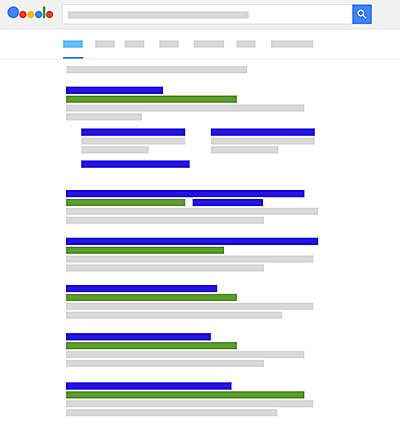
Your own website can be an excellent tool for winning new customers. This is especially true when it is listed well in Google's search results. Never before have so many potential customers first looked for information online and gone searching for providers there.
Nevertheless, there are still numerous businesses that leave this opportunity unused. They have not optimized their pages, or have not designed them in a way that allows good rankings. As a result, they are hardly found on Google and similar search engines. Fortunately, it does not have to stay that way. Small changes can often achieve a lot.
The concept of search engine optimization
Optimization is primarily about one thing: telling the search engine as clearly as possible which topics your website covers. Do not settle for one common title for the entire site; instead, assign a specific topic to the home page as well as to every single subpage.
Break the topics down into specific search terms. The goal is to be easy to find for each of these search terms later. In technical jargon, the selected search terms are called "keywords".
Example: Suppose someone runs an online shop that sells tools. It would then be advisable to optimize the home page for a keyword such as "tools online shop". So that individual product pages also rank well, they are assigned keywords such as "buy jigsaw".

The power of the page title
You can assign a keyword to a particular page by entering it in the page title. One of the most important optimization measures is therefore choosing the right title. For search engines, the title itself is one of the most important factors in determining the order in which search results are displayed and who comes out on top.
Many website operators find it difficult to pin down what the term "title" refers to. In fact, they see the titles of all kinds of pages constantly, since the title appears in three different places.
- In the title bar of the web browser
- As a bookmark/favorite in the web browser
- In Google's search results
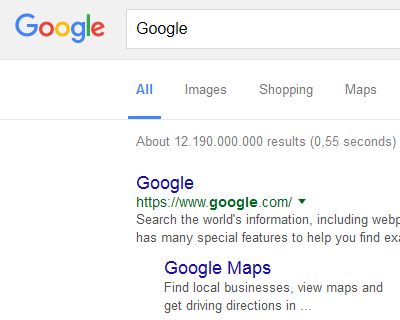
Optimizing the page title skillfully
Before you assign a title to each page, you need to define the keywords. Depending on the subject area, you do not have to limit yourself to one keyword. It is often possible to cleverly combine one to three keywords.
So do not focus too much on single keywords, but look beyond them instead. Depending on the products and services you offer, creative solutions are needed. Regionally offered services are a good example. Here it pays to combine the service and the location, or the job title and the location. For example, anyone who runs a driving school in Hamburg should not choose the title "Driving school", but rather "Driving school Hamburg".
Ideally, do not just put the bare keywords in the title, but form appealing phrases. Clever wording makes your titles stand out from other hits in the search results and increases the incentive to click. A phrase like "Pizza Cologne" sounds much less attractive than "Pizza in Cologne - delivery in 30 min."
When you define the page title, keep the length limit in mind. Technically, long titles are possible, but Google truncates titles in its search results. It is best to keep the title length under 55 characters. By the way, Google itself does not count characters here but pixels. Pixel lengths differ depending on the output device (PC, tablet or smartphone). The recommended 55 characters are therefore a good guideline.
Assigning the desired title to individual pages
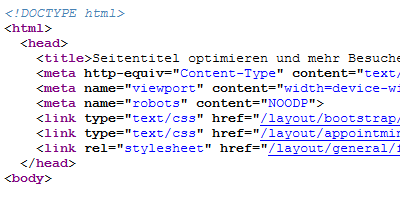
You assign the title of a page via the HTML code. To do this, open the code of each page concerned and then enter the desired page title. This is done within the corresponding HTML tag. The title is simply written between the two tags
If you run your website with a content management system (CMS) such as WordPress, it is usually not necessary to enter the page title directly in the code. Instead, it is entered in the post or page management. In WordPress, for example, the chosen page heading forms the title. Additional plugins (e.g. Yoast SEO) make it possible to define the page title independently of the heading. The plugin is also excellent for checking the title length.
Changing page titles works in a similar way to a content management system if you use a website builder. Please ask your provider how you can change the page titles.
Checking results in the search results
How long it takes for title changes to be recognized by Google and reflected in the search results cannot be said in general. It depends entirely on how large the website is and how often it is updated. In most cases, it takes about a week for the changes to become visible.
To check, search for your chosen keywords directly on Google. Depending on the subject area, it is quite possible to find your own page quickly and determine its position in the search results.
Google Search Console provides additional information. If you do not have one yet, you need to create a Google account and verify your own website. Google offers detailed instructions for this. Afterwards, you can see additional data in the "Search Console" that tells you, among other things, how many individual pages have been indexed and in which position they are shown in the search results.
The Search Console data relates exclusively to Google's web search. If you would like to get additional data on the number of visitors to your website and how they are composed, you can use the free Google Analytics.